Originially published at Hijinks Inc on September 1, 2010
____________________________________________________________
Lets be honest, Windows security is not the easiest thing to manage. On top of the Microsoft products, there exist the 3rd party programs that tend to be forgotten about. Microsoft has made great progress with the security of Windows in its most recent releases of Windows 7 and Office 2010, but that’s only part of the solution. The Microsoft update website and built in Microsoft update utility in Windows Vista and Windows 7 have helped a great deal with keeping Microsoft products up to date, but these are far from all of the programs that most people run. Persons crafting malicious code such as viruses, malware, etc know this and are targeting other programs too. These 3rd party programs do not have a common updater and each must be updated on its own, for example, programs like Adobe Flash Player, Adobe Acrobat, Java, and Firefox, just to name a few. It is a lot for the average user to do, especially considering there is no general update policy (IE, Patch Tuesday) with most vendors, and announcements about updates are quiet.
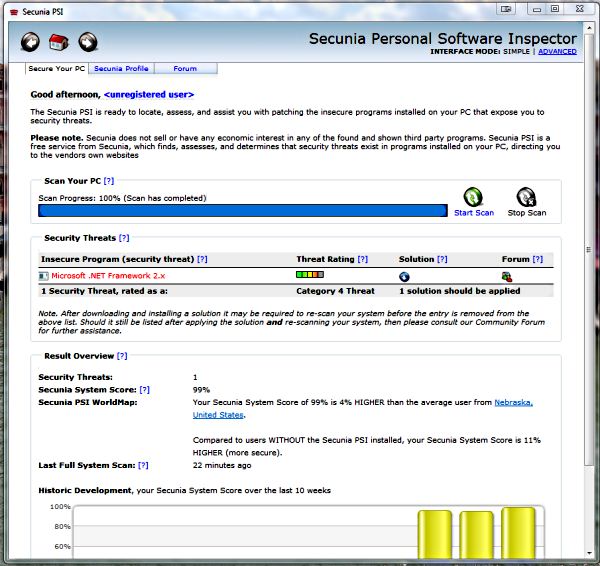
Enter Secunia PSI. This is a free (for personal use) program put out by the Secunia company. They specialize in finding exploits and providing monitoring software. PSI (Personal Security Inspector) is a tool that scans the programs on your hard drive and then does version checks against its vast list of known exploits. It then notifies you of older versions and tells you where you need to go to fix them. The program is great for finding those programs you rarely use and forget about when updating.
The program is smart. For Microsoft websites it knows to open them in Internet Explorer so the download tools will work. It also allows you to rescan specific programs after you update them instead of spending time to rescan your entire drive. It also offers the ability to ignore a specific program if for instance you need the older version for a custom tool to work. It will run in the background and notify you when new updates are available or new known exploits exist. It also offers an advanced mode which offers more features and details. In advanced mode PSI will tell you about products you have installed that are no longer supported by their vendors and any known exploits that exist in them.
Secunia also offers a product called OSI (Online Security Inspector) which is a great tool as well. It is similar to PSI but does not require you to install anything. However, it does require Java to run in the browser. While not as thorough as PSI, it’s similar in operation and usage.
In conclusion, this is a great tool that is very thorough and easy enough to use that every user should have this in their tool box and run it as part of a biweekly security audit. It really helps to inform users of out of date software that could leave their computer vulnerable. While PSI is targeted for personal use, they offer a corporate version that is a paid version. Its functionality is similar but it also offers many more features.
____________________________________________
Update #1
Since this article was originally posted Secunia has come out with a new version of its PSI security tool that is currently in beta. It is called Secunia PSI 2.0. You can grab a copy for free here. The big feature that this adds is the ability to install updates silently and automatically if you choose. I think this could be a great feature especially for people who don’t want to deal with always having to update their computers.